
About
I.C.A.R.U.S. is a stylish third-person action game. The player pilots a cutting-edge combat mech, using mobility and deadly combos to dominate battles on the ground and in the air.
Aerial and Ground Combat
Movement and combat flow into each other. The player skates on the ground, boosts into the air and chains it into a powerful spinning attack, switching between grounded and air combat naturally.
Destroy Groups of Enemies with Powerful Combos
Deadly combos let the player kill enemies in unique ways. Controlling space and combining attacks makes the mech feel powerful enough to defeat any opponent.
Distinct Enemy Types
Every enemy demands a different approach. Grunts give room for experimentation, ranged types break the pace and force prioritisation, and elites test the skills built up on the grunts.
Project Role
As technical game designer on I.C.A.R.U.S., I took responsibility for player movement, enemy design and music.
- Prototyped, designed, implemented and polished the full player movement set:
- Ground skating, hovering and ascending
- Ground ascend jump and boost jump
- Jet dodge, jet boost and perfect dodge
- Designed six enemy types and the shared state tree architecture they are all built on.
- Designed and implemented both the aerial and grounded enemy positioning systems, using custom EQS, built to keep enemies readable and to stop cheap hits landing from off-screen.
- Co-designed the attack token system with one other designer.
- Ran playtest sessions with structured surveys, and turned the results into tuning changes for every enemy.
- Worked with the animator and the VFX artist on enemy telegraphs, and with a second designer on the attack token system.
- Composed the combat, menu and trailer music.
- Implemented a dynamic music system that adds layers based on how well the player is performing.
Partway through the project the burst rifle and rocket enemies needed a new owner, so I took them over and rebuilt both.
3D Enemy Positioning System
I.C.A.R.U.S. is a high-speed 3D flight combat game. The player moves fast and on all three axes at the same time, and because the mech had to feel big, the camera sits close behind the player character. Together, those two things created the hardest design challenge on this project. How do you place enemies so they move naturally, stay readable, and don’t land cheap hits from behind, without the player constantly fighting the camera to keep them in view?
Every positioning system in the research, from God of War’s engagement rings to Spider-Man’s distance assignment, was built for grounded combat. God of War (2018) did have the same close-camera challenge as we did, and solved it with a front and back arc system. I took that concept and added vertical layers, so flying enemies sit at different heights, move more naturally, and still stay in the player’s view.
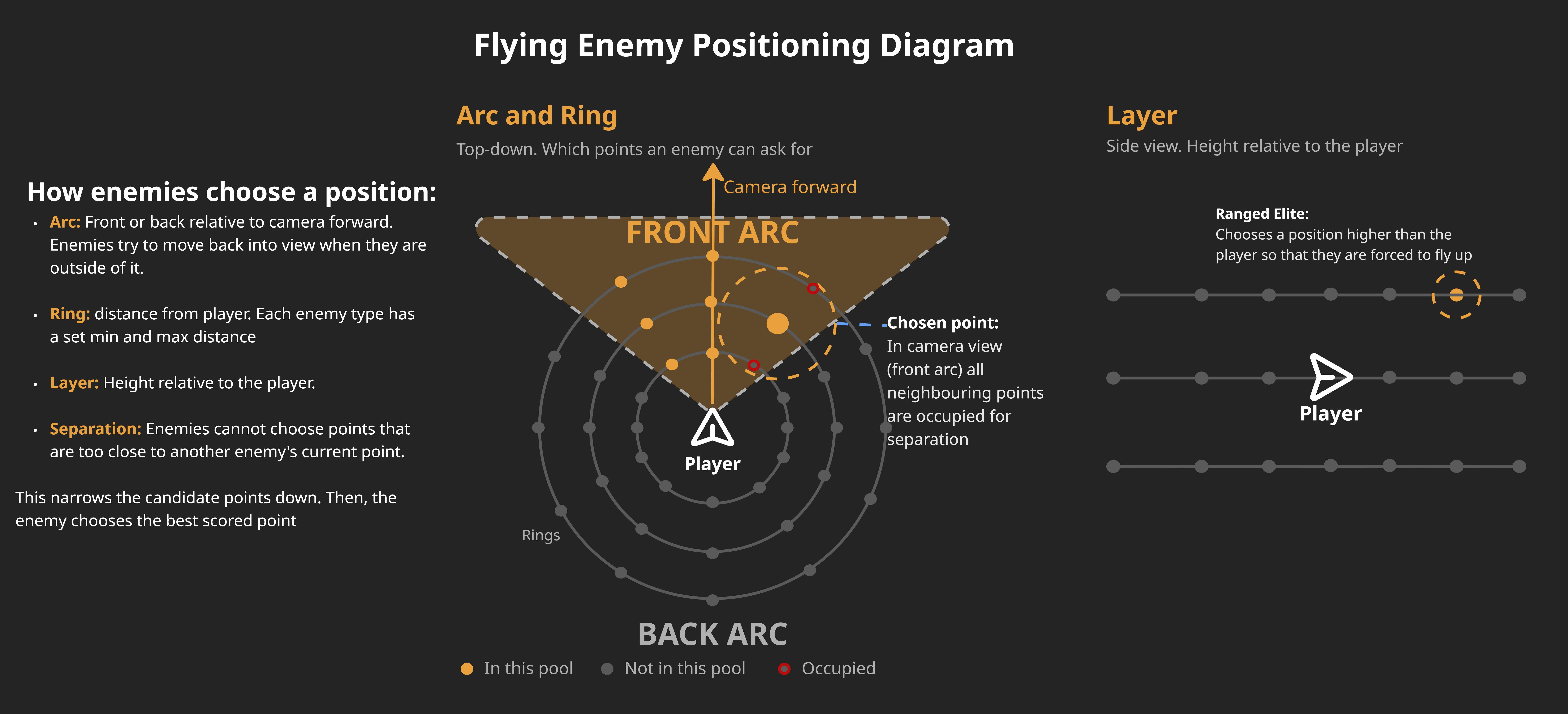
A custom 3D donut EQS generates rings of points around the player at multiple distances and heights.
What point an enemy asks for depends on its state. Attacking enemies choose a point directly in front of the player relative to the camera. Enemies that don’t currently have a token hold their distance and layer settings and stay in the arc they were in. These enemies also try to move back into the front arc whenever they leave it.
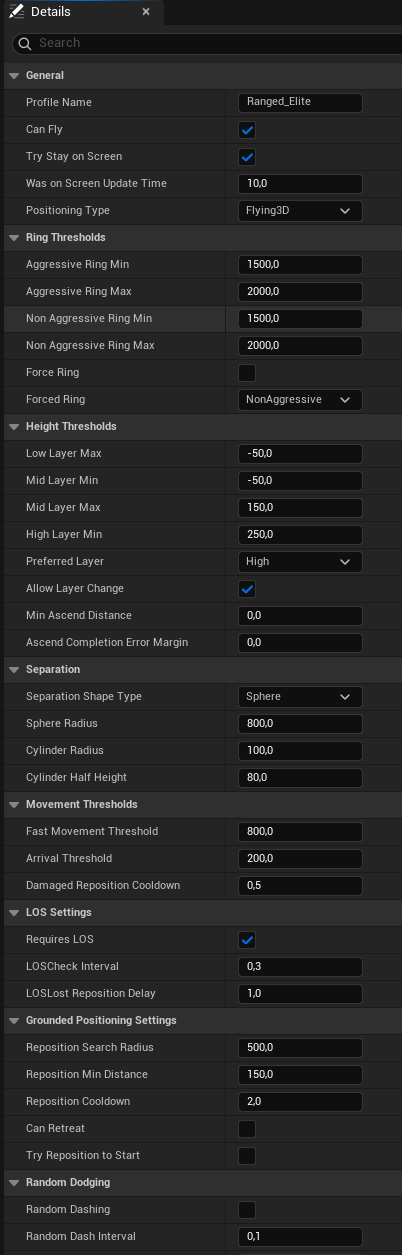
Ring distances, layer settings and separation radius all live in one positioning data asset per enemy type. Every enemy is tunable through this data asset without touching any code.
The two ranged grunts are grounded, and are meant to stay further away than the flying enemies, so they use a separate grounded EQS positioning system. They hold their position and only look for a new one when they lose line of sight or the player gets too close, choosing the new point through a grounded EQS donut around themselves.
Retrospective
One challenge I didn’t account for was the level geometry. Flying positioning only chooses points in open air, where almost anything is valid. The grounded version has to agree with a NavMesh built by someone else, in levels that kept changing through production.
The flying system came first and ended up the more polished of the two, while the grounded one still finds points off the NavMesh in the finished arenas. Next time the grounded variant gets tested against real level geometry instead of a test gym.
Jet Movement System
As technical designer, I took responsibility for the player movement system. In a game that is all about flying as a mech while fighting, two things were important to get right:
- Players need a sense of freedom in their movement. They should be able to easily move wherever they want to go.
- Movement and maintaining position must be easy to control, even in combat. It should not become a distraction or require too much thinking. During combat the player’s attention should be on fighting, not on staying in position or flying.
Unreal’s default movement component was very restrictive for my needs: it assumes grounded locomotion, only handles instant velocity launches, and its gravity felt way too floaty. Together with the player combat designer, we worked towards a solution that feels good both during combat and outside of it.
The framework
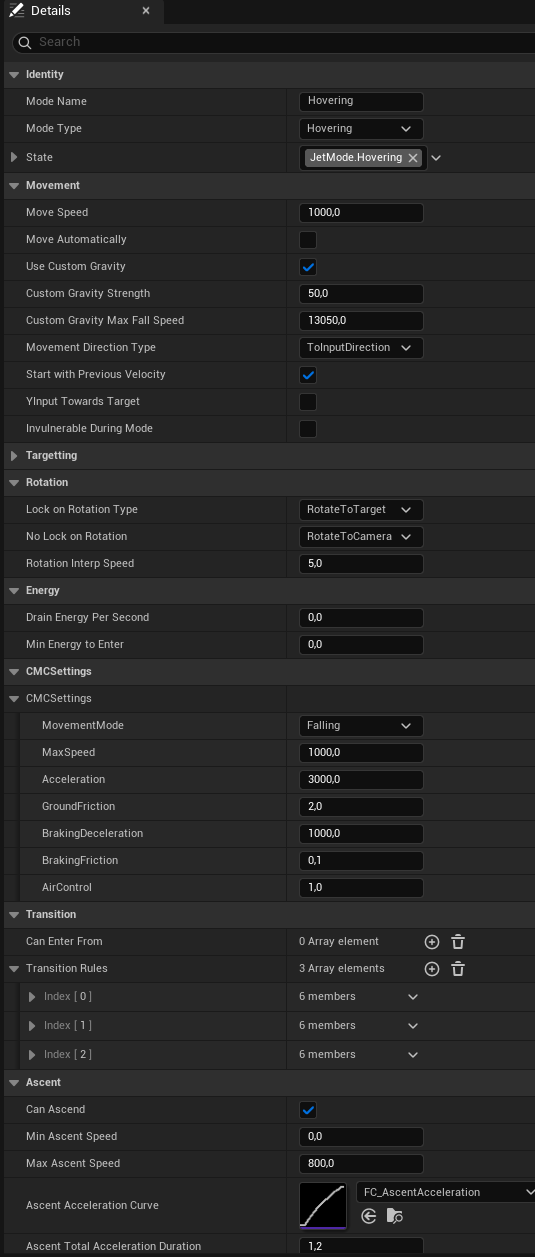
Both of those intents pointed at the same answer: a modular flight movement framework driven by data assets and two components.
BPC_JetMovementMode handles the continuous states: JetSkate, JetHover and
JetBoost. BPC_JetImpulse handles the one-shot bursts: BoostJump, JetDodge
and Groundslam.
- One data asset per mode and impulse (
DA_JetBoost,DA_JetDodgeand so on). Each data asset contains everything that defines the rules and feel of that move. - Transition rules as
CanEnterFromandCanExitToare also handled through the data assets, to prevent hard-coded state rules. - Impulse movement is velocity and curve-driven instead of using a launch character, and uses custom gravity instead of Unreal’s default. I needed a lot of control to get the movement to feel exactly how I wanted, and to fit the feeling of controlling a flying mech.
One function handles a transition. It checks
CanEnterFrom and whether there is energy, and if both pass it swaps in the new movement settings, blends velocity with the new curve and sets the custom gravity.
Adding a new movement mode is just adding a new data asset. That is what made the second intent achievable: with every value exposed as data, each mode could be retuned between playtests until holding a position in combat stopped taking too much thought.
Getting JetBoost right
JetBoost did not work at first. It was a flat horizontal boost with slow turning, and it felt static and unsatisfying.
Changing the movement direction to follow input relative to camera forward fixed it in one change. Players had real control over where they were boosting, the whole movement system felt more complete, and JetBoost went from the mode nobody used to one of the most satisfying states to be in.
Before : horizontal only
After : camera-relative
Cutting the block mechanic
We initially had both a block and a dodge as defensive mechanics. Blocking was the easier one because it didn’t require timing, but it required you to stand still, when movement is the whole point of our game. We decided to scrap the block and put more effort into making the perfect dodge feel good and getting it into a presentable state.
Retrospective
Looking back, the movement system was overscoped. There were even more abilities planned, like a wall launch and wall running, and I had to be reminded that this is a combat game, not a traversal game. Focusing on making the movement fit the combat’s needs is what brought it together.
The mode and impulse structure turned out to be extremely useful: it gave a lot of control and made iteration quick. Removing the block and doubling down on the perfect dodge was a good move. Flying straight up still has room to improve, so I flagged it to the level designers and they avoided building anything that needs a lot of vertical climbing.
Enemy Design
The enemy roster is designed as a set, not as six separate enemies. Each one has to be handled differently, which is what keeps combat interesting once you start combining them. I balanced every enemy for fighting in a group rather than in an empty test level.
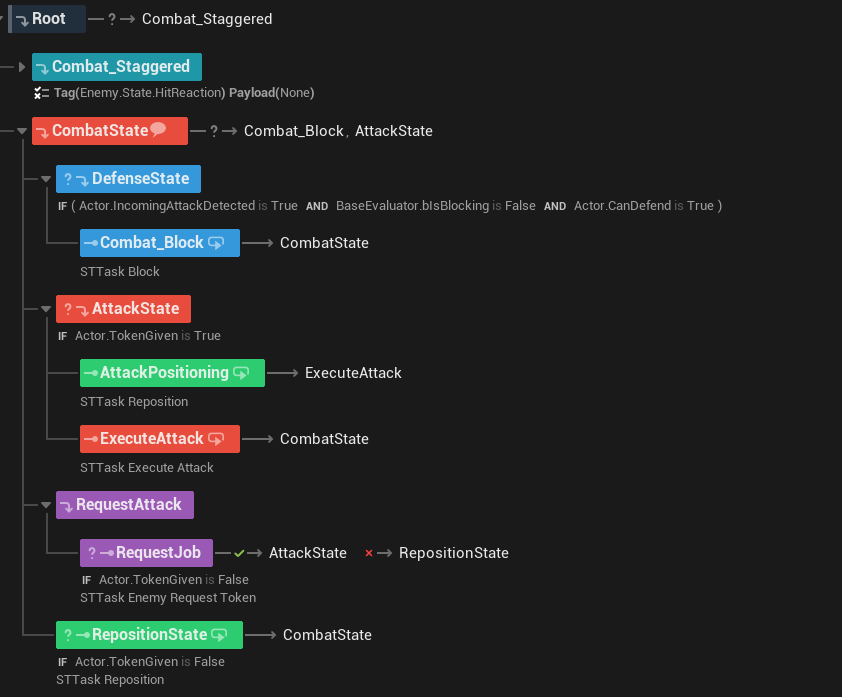
All six are built on one shared state tree architecture with a common set of tasks: move to an assigned point, request a token, defend against an incoming attack, attack. Everything that makes an enemy distinct is controlled in its data. Adding an enemy means adding and tweaking a set of data assets, which is a large part of how I got six enemies to a playable state.
The attack token system
The enemy attack token system limits how many enemies can perform an attack at the same time. Without it, every enemy can attack at the same time and the fight becomes unfair. Enemies without a token hold their position and wait for their turn.
This system was co-designed with Bernardo Mauricio, who is also a technical designer. I gave him references, Marvel’s Spider-Man and God of War (2018), and the GDC talks on their enemy AI, and he designed and implemented the first version based on them. In that version only one enemy could attack at a time, scored by per-enemy weights in a data asset so elites had a higher chance of winning the token, while enemies that had waited longer also had a higher chance.
It worked, but it cost the ranged enemies their threat level. Their design intent was to break the pacing of melee combat and push the player to reposition and prioritise, and with melee enemies waiting their turn while ranged ones shoot, there was no real risk to keeping ranged enemies alive. I asked for a second, separate token pool for ranged enemies, letting melee and ranged commit at the same time. Later I added per-enemy-type cooldowns, then balanced the scoring and the cooldowns so elites are an aggressive threat without their patterns becoming unreadable.
| Enemy | Design Goal | Ownership |
|---|---|---|
| Melee Grunt | Teach the basic read with a generous telegraph, and let the player feel powerful handling several at once | Designed & built |
| Assassin | A faster melee read than the grunt. Teaches the player to time reactions rather than crowd-control | Designed & built |
| Burst Rifle Grunt | Break combat pace and create target prioritisation. Stops mindless button mashing | Took over & rebuilt |
| Rocket Grunt | A bigger threat that demands focus and dodge timing, with a higher reward: send the rocket back | Took over & rebuilt |
| Melee Elite | Commit to a read instead of spamming attacks. Learn the attack patterns. The mastery challenge | Designed & built |
| Ranged Elite | Chase it, and fly to do so. Punishes players who play too aggressively and stop watching telegraphs | Designed & built |
Enemy Deep Dives
Melee Elite
The grunts let the player spam attacks and still win. That is not possible while fighting the Melee Elite. Its timings are deliberately uneven, and one key move even holds at the top of the animation before committing. Patterns have to be learned, and players need to read the attack animations instead of spamming dodge.
Playtesters found the first version unfair. The enemy had too much health, dealt too much damage, did not have enough telegraphing, and the player’s dodge window was too small. Raising its numbers was never the right way to make him challenging. What worked was distinct attack patterns, more attack animations, shorter cooldowns and a way to break the player’s combo.
After testing that version, players found the enemy even harder to defeat, but also more fun. They specifically mentioned that dodges sometimes still hit them even when the timing felt right, and that there was no indicator for when an attack was about to land. To make it more forgiving, I increased the dodge window from 0.15s to 0.25s and added an eye glow VFX indicator right before an attack lands.
In the latest version 80% of testers said the attacks were dodgeable once they learned the patterns, 80% rated the aggression as the right timing, and most players beat him within one to four attempts. Three testers also mentioned that the eye glow indicator was a helpful tool to read attacks, which confirmed its purpose.
Ranged Elite
The Ranged Elite is the reason the positioning system has layers. It always picks a point far away and one layer above the player, which turns the fight into a chase and pushes the player into using their movement. The enemy breaks player patterns and punishes aggression by dodging attacks.
The shockwave attack was the hard part. The idea came from wanting a moment of anticipation, where the player knows a mistake has been made and has to watch a heavy attack charge at them. Making that feel fair required an extremely readable telegraph that still looked dangerous.
During initial tests the shockwave scored 2.6 out of 5 on readability, and 60% of testers rated the dodge frequency as too high. Together with the animator and the VFX artist we reworked the telegraphs for all of this enemy’s attacks, and made the shockwave readable both on and off screen while still feeling powerful. I also decreased the dodge chance and increased the dodge cooldown, so players get more chances to land a hit.
Now four playtesters voted the Ranged Elite the most enjoyable enemy to fight, and it takes players one to two tries on average to beat it.
Dynamic Music System
The combat, menu and trailer music for I.C.A.R.U.S. is composed by me, and so is the dynamic music system that plays during gameplay.
The combat score is layered, and the layers are driven by the style meter. Fight well, gain style points, and the system brings more of the track in. The music acts as feedback: the player feels stronger when they play well, because of the score as much as the gameplay, and it reports how the fight is going without anyone needing to look at the UI.
Writing the music and implementing it taught me how much impact a score has on gameplay. It helped get players into a flow, and the layer system added a sense of power and mastery to playing well. Building it also meant learning MetaSounds and MetaSound Source assets in Unreal.
Reflection
Working in a team of sixteen was the real learning curve on this project. It went well because we communicated often, updated each other regularly and kept a proactive attitude. When assets or features did not make the build, nobody treated it as someone else’s job to solve. We stepped into other disciplines where it was needed instead of guarding our own to-do lists, and we deliberately planned fewer hours than we had, so there was room for unexpected events and for the tasks nobody specifically owns.
I’m proud of the product we were able to create in such a short time. The systems are all very complex and still work well together, and there aren’t many bugs left in the final build.
I underestimated how much time would go into the final stages of production, the polish and the fixing, so I should have left more room for that in my planning. Next project, that time gets reserved up front instead of found at the end.